

Campaign Lines
Purpose
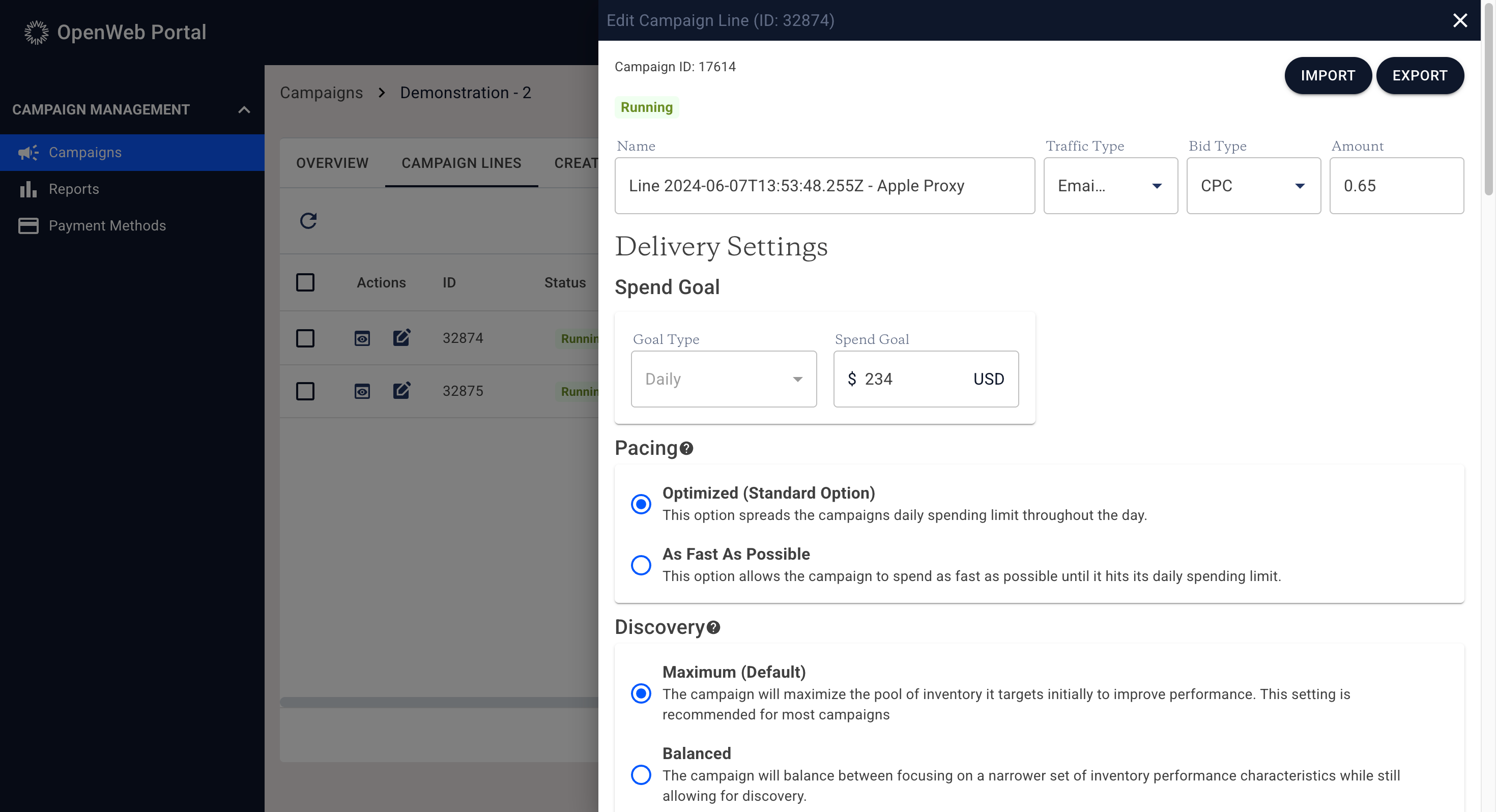
The Campaign Line Detail page defines how a campaign line delivers, spends budget, and targets traffic.
Changes made on this page directly impact delivery behavior and spend velocity.
Page Structure
At the top of the page:
- Breadcrumb navigation indicates campaign and line context.
- The campaign ID and current campaign status (Running, Paused, Archived) are displayed.
- Import and Export controls are available in the upper right.
Import & Export Configuration
Campaign line configurations can be exported and reused.
Export
Export downloads the current line’s configuration in a structured format. This is recommended when creating similar lines or preserving a preferred configuration template.
Import
Import allows you to upload a previously exported configuration file to:
- Overwrite the current line’s configuration, or
- Populate settings when creating a new line
The import format is strict. It is strongly recommended to export from an existing configured line before attempting to modify and re-import settings.
Note: Importing a configuration overwrites the existing configuration of the current line.
Core Configuration Fields
Basic Settings
- Campaign Line Name – User-defined name.
- Traffic Type – Defines eligible traffic source categories.
- Bid Type & Amount – Defines pricing model and bid amount (e.g., $0.25 CPC).
Bid adjustments impact auction competitiveness and delivery behavior.
Delivery Settings
Daily Spend Goal
The Daily Spend Goal defines the maximum spend for the campaign line per day.
- Budgeting operates on UTC time.
- A "day" resets at 00:00 UTC (7PM EST during standard time).
- Lines are evaluated approximately every 30 seconds to determine if they may serve impressions.
Budgeting acts as an on/off control:
- When under allowed spend, the line is eligible to serve.
- When over allowed spend, the line is temporarily unavailable for new impressions.
Important considerations:
- Previously served impressions may still generate clicks and CPC revenue during off periods due to 24-hour ad caching.
- Dayparting cannot strictly guarantee zero spend during restricted hours for this reason.
Pacing
Pacing controls how the daily budget is distributed throughout the day.
Two options are available:
Optimized (Default)
Spreads available spend throughout the day based on modeled revenue potential.
The system:
- Uses a base revenue curve
- Adjusts for dayparting windows
- Scales early hours if contiguous
- Allows controlled acceleration near the end of availability windows 
This helps:
- Reduce early budget exhaustion
- Improve full budget utilization
- Maintain stable delivery throughout the day
As Fast As Possible (ASAP)
Disables pacing constraints and allows up to 100% of the daily budget to be spent during eligible hours.
This means:
- Budget may be exhausted early in the day
- Delivery may stop once daily goal is reached
Use this option when immediate spend velocity is preferred over smooth distribution.
Discovery
Discovery controls how aggressively the system explores new inventory.
Maximum (Default)
- Maximizes exploration across a broader inventory pool to identify high-performing traffic.
- Recommended for most campaigns.
Balanced
- Balances stable known inventory with selective exploration.
Minimal
- Focuses on a narrow set of inventory with known performance characteristics.
- Lower discovery reduces exploration but may limit performance expansion.
Discovery impacts which inventory the campaign is eligible to test and optimize against over time.
Dayparting
Dayparting restricts when a campaign line may serve during the day.
Important:
- Dayparting works in conjunction with pacing.
- Budget availability is redistributed across eligible hours.
- Due to impression caching, clicks may still occur outside configured hours.
Targeting Settings
Device & Proxy Targeting
Campaign lines may target:
- Apple Proxy
- Gmail Proxy
- Outlook Proxy
- Yahoo Proxy
- Desktop
- Phone (iPhone, Android)
- Tablet (iPad, Android)
Important Geo Limitation
When targeting proxy traffic:
- Country-level geo targeting is reliable.
- State or city targeting may be inaccurate due to proxy masking.
If combining proxy and non-proxy device types:
- Only country-level geo targeting is supported.
- State or ZIP targeting with mixed proxy/device configurations is restricted.
To allow the campaign to run across all device and proxy types, leave the Device Targeting section empty.
Inventory Targeting
Inventory Targeting allows advertisers to explicitly include or exclude specific publisher companies or individual placements from a campaign line.
Overview
The Inventory Targeting interface is organized into two columns:
- Left Column – Search and selection of available inventory
- Right Column – Included and excluded selections
Inventory can be targeted at two levels:
- Publisher Company level (includes all placements under that publisher)
- Placement level (individual ad placements within a publisher)
Depending on account configuration, advertisers may see:
- A limited, curated list of targetable inventory, or
- The full set of eligible publisher companies and placements
Searching & Filtering Inventory
At the top of the left column is a search bar.
- Users may enter one or more inventory IDs.
- Multiple IDs must be separated by commas.
- Results update based on matching IDs.
A filtering control is available to refine results. Filtering options include:
- Exact match – Restricts results to exact ID matches.
- Hide publishers – Shows only individual placements.
- Hide placements – Shows only publisher companies.
These controls allow advertisers to narrow targeting with precision.
Below the search controls, the interface displays the total number of available targetable inventory options.
Including & Excluding Inventory
Inventory may be explicitly included or excluded.
- Selecting a publisher company includes or excludes all placements under that publisher.
- Expanding a publisher (via chevron control) allows individual placements to be selected independently.
Selected items appear in the right-hand column as either:
- Included
- Excluded
Items in the right-hand column can be removed by clicking the "X" next to the item.
Important Considerations
- Inventory targeting overrides general eligibility for the campaign line.
- Including specific publishers or placements narrows delivery to only those selections.
- Excluding publishers or placements prevents delivery to those selections even if they otherwise meet targeting criteria.
- Overly restrictive inventory targeting may significantly limit delivery volume.
Inventory targeting should be used when advertisers require precise placement control or when optimizing based on known performance characteristics.
Age & Gender Targeting
Available only for Apple News campaign lines.
Geo Targeting
Supports:
- Country
- State / Region (primarily US)
Geo targeting interacts with device and proxy targeting rules as described above.
ZIP Targeting
- Accepts include or exclude lists.
- CSV upload supported.
- One ZIP code per row is required.
Saving Changes
Selecting Save applies configuration updates.
Changes may take effect in near real time, but reporting metrics may reflect updates with processing delay.
Some fields may be read-only depending on user permissions.
Targeting Limits & Complexity
Campaign lines support a wide range of targeting controls, including:
- Device & proxy targeting
- Geo targeting (country, state/region)
- ZIP code targeting
- Inventory targeting (publisher companies and placements)
In certain cases, highly granular configurations, particularly those combining large ZIP lists, extensive geo targeting, and detailed inventory selections, may exceed system limits.
If a configuration cannot be saved due to targeting complexity, consider:
- Reducing the number of included or excluded ZIP codes
- Narrowing inventory selections
- Splitting targeting across multiple campaign lines
Breaking targeting into multiple campaign lines is often the most effective approach when working with highly segmented strategies.
If you encounter repeated validation errors while saving a campaign line, contact your account team for guidance.
Permissions
Edit capabilities may vary by account role. If certain fields are not editable, they may require administrative access.
Updated 7 months ago